Vulnerability Scan vs Penetration Test: Another Day, Another Fake Pentest
/ CybeRaccoon / 10 min read
Another day, another client holding a "penetration test" report that is really a scanner export nobody verified. The short version: a vulnerability scan lists what might be wrong; a penetration test proves what an attacker can actually do. A scan is automated, fast and cheap. A penetration test is skilled people manually exploiting, chaining and verifying weaknesses, then showing the business impact with evidence. The market is full of firms that can run a tool and ask a chatbot what to write in the report. Far fewer have testers who can find what the tool missed. Below: what the difference really is, how to tell which one you paid for, and why we use AI and automation to make testers faster, never to replace them.
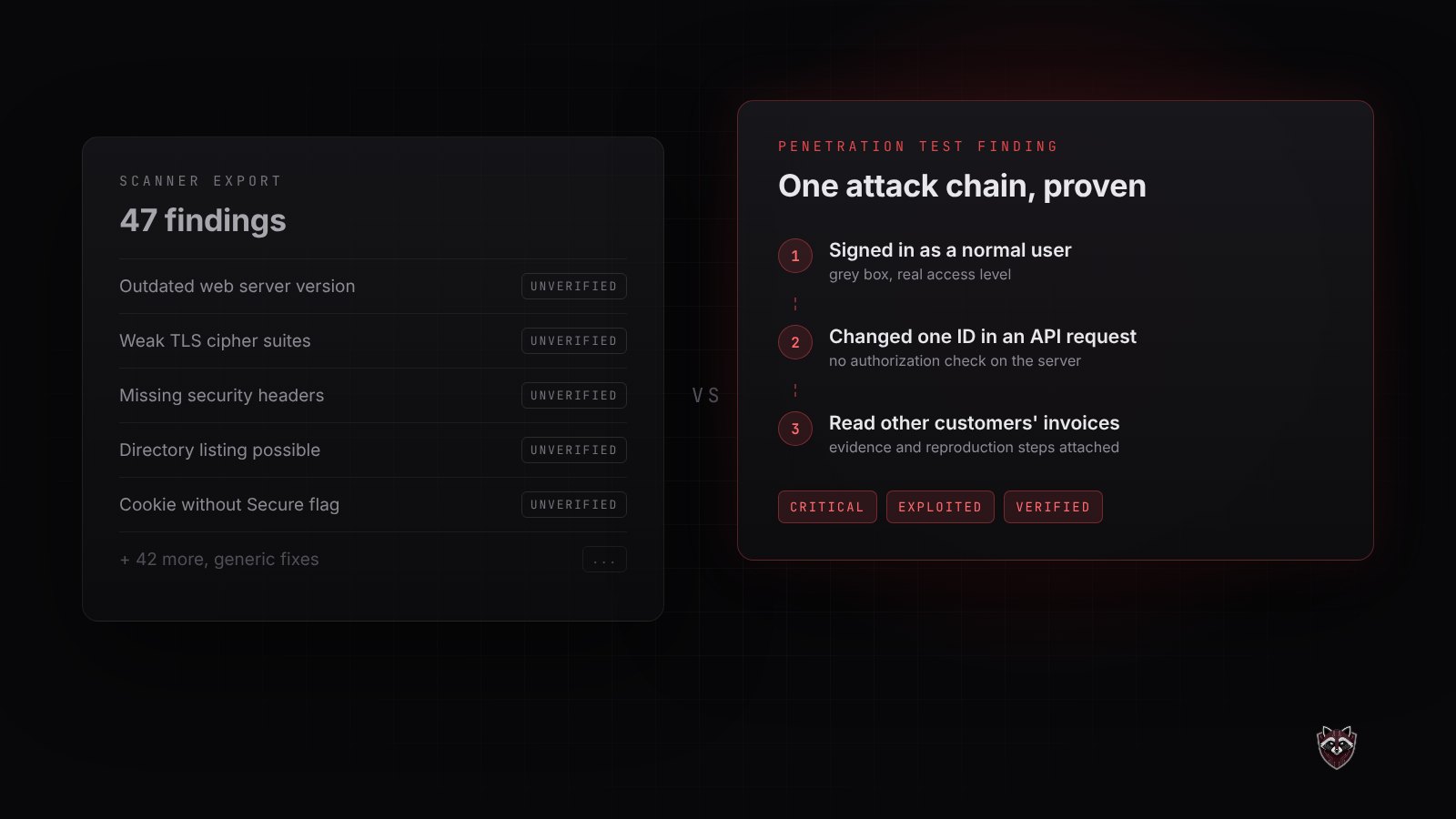
What happened when a client asked us to retest their "penetration test"?
A company recently sent us a report and asked for a retest. They had fixed the findings, and they wanted someone to confirm the fixes held.
The report had a penetration test title on the cover. Inside was a ranked list of known vulnerabilities with severity scores and generic remediation text. There was no attack narrative, no proof that anything had been exploited, and no sign anyone had logged in and tried the application the way a real attacker would. It was scanner output with a nicer cover.
This is not rare. It is close to routine. And the company had done everything right on their side: they budgeted for security, bought a "pentest", fixed what it found. What they bought was a scan, and they had no way of knowing.
So here is the guide we wish every buyer had before signing a quote.
What is the difference between a vulnerability scan and a penetration test?
The difference is between possible and proven.
What a vulnerability scan does
A scanner compares your systems against a database of known issues: outdated software, missing patches, weak TLS settings, exposed services, default configurations. It is automated, it runs in minutes or hours, and it is genuinely useful. Every security program should scan regularly.
But a scanner only knows what it has been told to look for. It cannot tell whether a finding is actually exploitable in your environment, and it produces false positives that someone has to filter by hand.
What a penetration test does
A penetration test asks a different question: what can an attacker actually achieve? A tester logs in as a normal user and tries to reach another customer's data. They change a parameter the interface never lets you touch. They chain three "low" findings into one critical breach. Then they document every step with evidence, so your developers can reproduce it and fix the root cause.
| Vulnerability scan | Penetration test | |
|---|---|---|
| Who does it | Software | Skilled human testers, assisted by tools |
| Finds | Known, catalogued issues | Logic flaws, access control failures, chained attacks |
| Proves exploitability | No | Yes, with evidence |
| False positives | Common | Verified out before reporting |
| Output | List of CVEs and scores | Attack narrative, impact and fixes |
Both have a place. The problem starts when one is sold as the other.
Why is the market flooded with scanner reports sold as pentests?
Because the tools got cheap and the reports got easy to dress up.
Commercial and open source scanners are widely available. Generative AI can now turn raw scanner output into fluent, professional-sounding prose in seconds. Put those together and anyone can produce something that looks like a penetration test report without any of the expertise a penetration test requires.
What did not get cheaper is talent. Finding a broken authorization check in a multi-tenant API, or spotting that a password reset flow can be abused, still takes an experienced tester who understands how applications fail. That skill is scarce, and it is exactly what a buyer is paying for. It is also why honest pricing follows the testing time a scope needs, as we explain in what a penetration test costs.
How can you tell if your penetration test report is really a scan?
Open your last report and check it against these warning signs:
- No proof of exploitation. Findings are listed, but none shows what was actually done or reached.
- No attack narrative. A real test reads like a story of how access was gained and escalated. A scan reads like a spreadsheet.
- Only known CVEs. Nothing about business logic, access control or how your specific application behaves.
- Generic remediation. "Update to the latest version" for everything, with no fix tied to your code or configuration.
- No authenticated testing. Nobody logged in, so nothing behind the login page was tested.
- Unverified false positives. Issues that do not apply to your environment are still in the report.
- A suspiciously short timeline. A complex platform "tested" in a day. See how long a penetration test takes for what realistic looks like.
- No retest included. Nobody comes back to confirm your fixes actually work.
If you want a reference point, compare it against our sample penetration test report. The difference is usually obvious within a page.
Can AI do a penetration test on its own?
Not today, and not the parts that matter most.
Where AI and automation genuinely help
AI is excellent at speed and volume. It helps map a large attack surface quickly, sort and deduplicate thousands of scanner results, flag patterns worth a closer look, and turn a tester's notes into a clean first draft of a report. Automation re-runs known checks so verifying a fix takes minutes instead of days. Used well, this means more of the paid time goes into real testing.
Where only a human tester finds the problem
AI does not understand your business. It does not know that a junior employee should never approve their own expense report, that one tenant must never see another's invoices, or that a discount code should not stack forty times. Those are business logic and access control flaws, and they sit behind many serious breaches. Finding them takes judgment, creativity and context. So does deciding whether a finding truly matters, which is the line between a report you can act on and one you have to second-guess.
The honest summary: AI makes good testers faster. It does not make a scan into a penetration test.
How does CybeRaccoon combine manual testing and automation?
We use automation and AI where they are strong, and people where they are irreplaceable.
Scanners run first, to clear the known issues and the noise. AI tools speed up the repetitive work around the test. Then our testers spend their time where tools are blind: authenticated testing, business logic, privilege escalation and chained attacks across web applications, APIs, mobile apps, networks and cloud environments. Our penetration testing services page covers each of these in detail, and how we work explains why manual testing is the core of every engagement rather than an add-on.
Every finding we report is verified, explained in business terms and paired with a specific fix. And the retest is included, because a fix only counts once the same attack has been tried again and fails. The same rigor applies to newer risks too, such as encryption that will not survive the move to post-quantum cryptography.
What should you do if you already have a scanner-based report?
Do not throw it away. Fixing scanner findings is worthwhile hygiene. Just do not treat it as proof that your systems were tested.
Here is what that looks like in practice. This is an anonymized excerpt from the report we were asked to retest, with plugin names generalized and versions removed. Seven of its eleven rows end in "manual verification required". That verification is exactly the work a penetration test exists to do, and nobody did it.
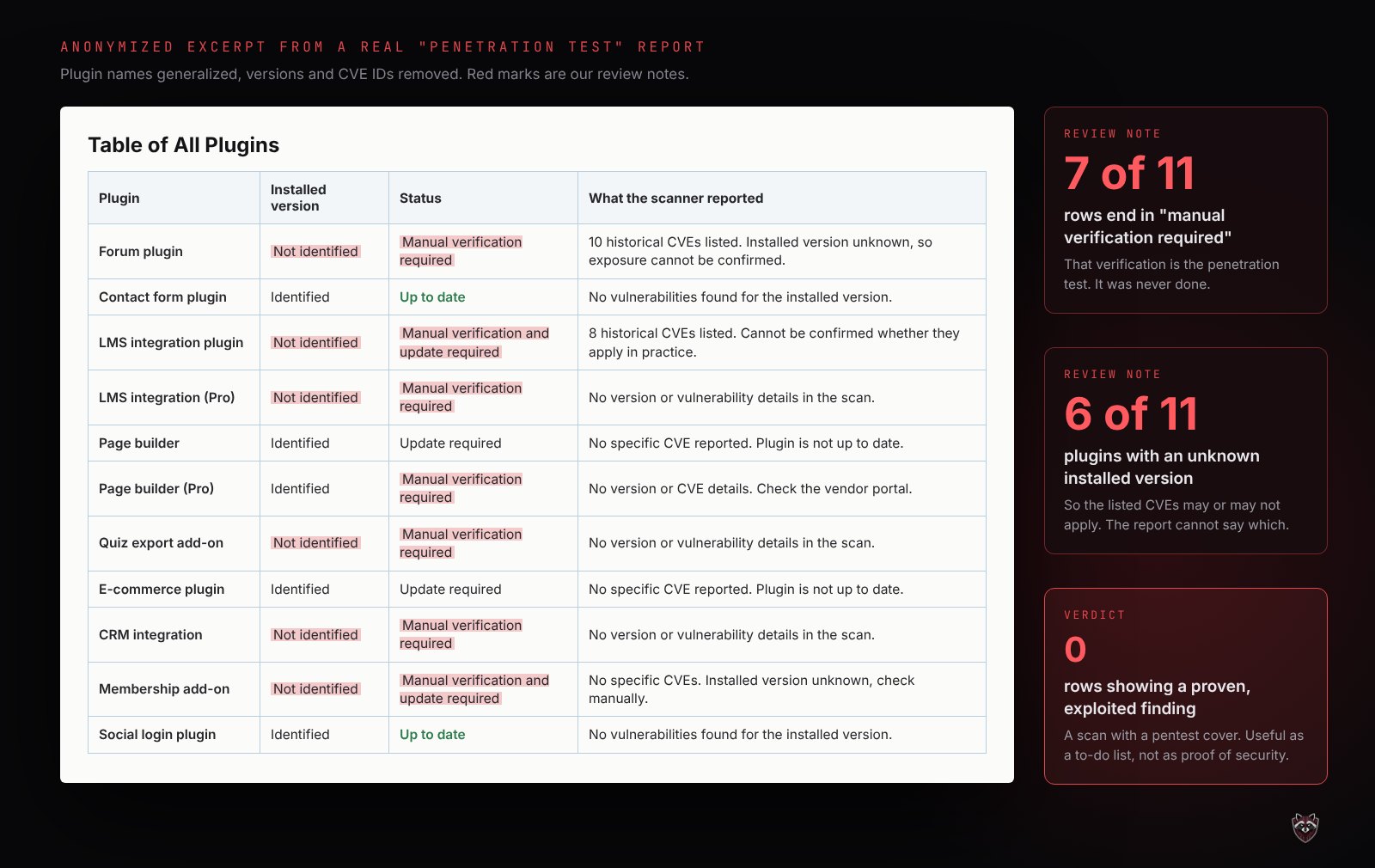
Ask your vendor directly: which findings were exploited, what evidence supports them, and what was tested while logged in. If the answers are vague, plan a real penetration test for the systems that hold customer data or money first. Get in touch and we will scope it properly, starting with the report you already have.
You can find more practical guidance on the CybeRaccoon blog, or start from our homepage to see everything we test.